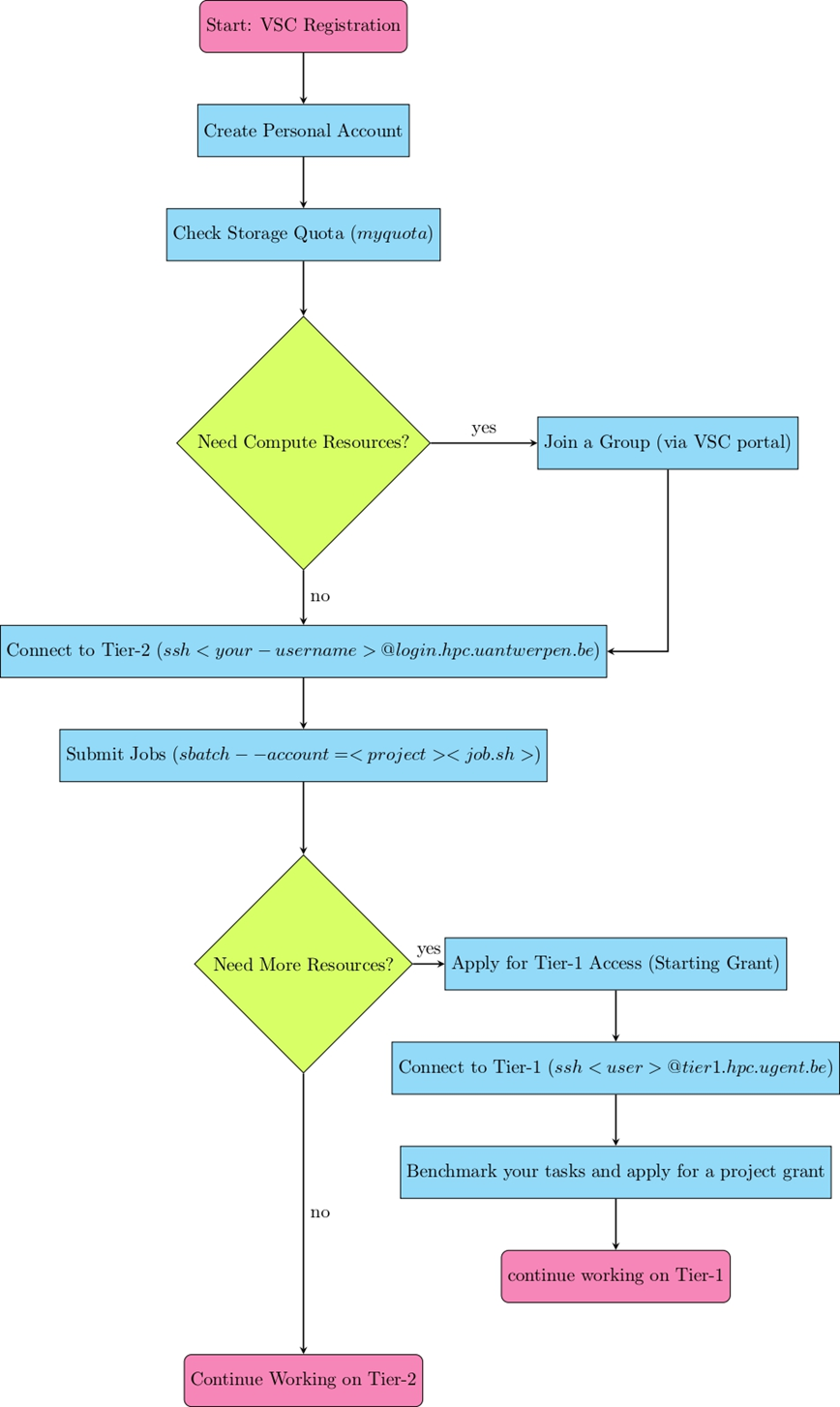
VSC (Flemish Super Computer)
Getting Started on the VSC (Tier-2 at UAntwerpen)
It is highly recommended to use the VSC. If you have questions about this, don’t hesitate to ask!
Read the documentation. The VSC is not long-term storage.
Personal Account
- Go to the VSC documentation and follow the steps under “New VSC Account: UAntwerpen (AUHA)” to set up your account.
- If you have any issues, contact the system administrator.
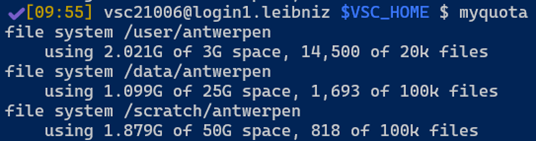
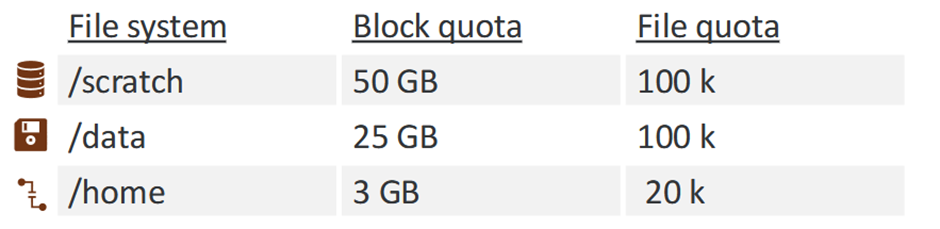
With this account, you can store a limited number of files. Storage is subject to quotas, which you can check with:
myquota
This will show your current usage and available storage. For more details, visit Calcua.
- Overview of the quotas for storage on the Tier-2 VSC (Calcua website).
Getting Compute Resources (Groups & Projects)
If you want to run computations, you need to be added to a group. Each group has projects with specific compute and storage allocations.
To check which groups and projects you have access to:
groups
myprojectaccounts
- Snapshot of the output of the
groupscommand and themyprojectaccountscommand on the VSC Tier-2.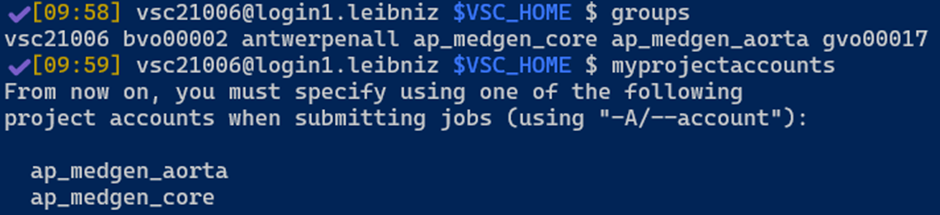
If you need to be added to a group, contact your group leader or request access via the VSC account portal.
Making a group
If you are a group leader, you can make a group via your personal account on the VSC with the button “New/Join Group”.
Connecting to the UA Tier-2 Cluster
Once your account is set up, connect to the cluster via SSH:
ssh <your-username>@login.hpc.uantwerpen.be
To see available software modules:
module avail
To load a module:
module load <module-name>
To submit a job (make sure to specify the correct project):
sbatch --account=<project-name> <job-script.sh>
Monitor jobs with:
squeue -u <your-username>
For more details on working with SLURM and HPC systems, check the Calcua documentation.
Getting More Resources (Moving to Tier-1)
The Tier-2 cluster at Antwerp supports most workloads, but if you need more resources, you can apply for Tier-1 access (Hortense).
Tier-1 Access & Grants
VSC Tier-1 resources require a grant. There are five types:
- Tier-1 Compute Starting Grant (for optimizing pipelines)
- Up to 500k core hours or 1,000 GPU hours
- Maximum 8 months duration
- Requests anytime, no deadlines
- Free of charge
- Tier-1 Compute Grant (for larger projects)
- Between 500k – 7.5M core hours or 1k – 40k GPU hours
- Duration: 8 months
- Application deadlines: February, June, October
- Tier-1 Data Starting Grant
- Same resources as a full Tier-1 Data grant
- Tier-1 Data Grant
- Storage: 5 TiB – 1 PiB
- Duration: 8 months – 4 years
- Tier-1 Compute Collaborative Grant (for joint projects)
- Up to 10M core hours or 75k GPU hours
- Maximum 12 months duration
- Requires at least three research groups from different institutions
- Applications accepted on a rolling basis
Applying for Tier-1 Access
- You must start with a Starting Grant before applying for a full project grant.
- Applications are submitted through the VSC portal.
- Deadlines:
- Starting Grant: Anytime
- Project Grant: February, June, October
Connecting to Tier-1 (Hortense)
Once approved, connect via SSH:
ssh <your-username>@tier1.hpc.ugent.be
Tier-1 also uses SLURM for job scheduling, so the commands are the same as Tier-2.
More Information
- VSC Documentation: https://docs.vscentrum.be/
- Calcua Training & HPC Courses: https://www.uantwerpen.be/en/research-facilities/calcua/training/
- VSC Compute Access & Grants: https://www.vscentrum.be/compute