CMG-UA GitHub Manual
This is the GitHub page of the Center for Medical Genetics (CMG) at UZA and the University of Antwerp. If you are new here and want to collaborate on projects, take a look at these best practices and workflow guidelines.
More information about CMG can be found on the CMG website.
Best Practices
All CMG code must be stored on GitHub, not just on the server.
GITHUB IS NOT A DATA STORAGE PLATFORM! Do not commit files larger than 50MB.
- Always document your code properly.
- Each project should have its own repository with a dedicated
README.mdfile. - Use special repositories for code that is commonly used across projects.
How to Use GitHub
A useful cheat sheet for reference: GitHub Education Cheat Sheet.
Essential Git Commands
To clone a repository on your local machine:
git clone <ssh_link_github_repository>
To create a new branch for making changes without modifying the original code:
git checkout -b <branch_name>
To check the status of your local branch:
git status
To add your changes to Git:
git add <your_changes>
To commit your changes with a descriptive message:
git commit -m "<descriptive commit message>"
To push your changes to GitHub:
git push
Merging Your Code into the Main Branch
Once your work is complete, you need to create a pull request on the CMG GitHub page to merge your changes into the main branch.
Steps to create a pull request:
- Go to the project repository and select your branch.
- Click on Contribute → Compare & pull request.
- Review your changes and click Open pull request.
NEVER PUSH DIRECTLY TO THE MAIN BRANCH!
Reporting Issues
If you encounter an issue, you can create a GitHub Issue in the project repository.
- Be as detailed as possible to help the person resolving the issue.
- Asking questions is encouraged—your discussion may help others in the future.
To create an issue:
- Navigate to the Issues tab next to the Code tab.
- Click New issue.
Forking Another Person’s Project
Need something from another project but can’t modify it directly? You can fork the repository to create your own copy. Once you’ve made your updates, submit a pull request to contribute your changes back.
Special Repositories for Common Code
If you have code that is widely useful, place it in a common library to benefit your colleagues.
This code should be:
- Well-documented (with a
README.mdfile). - Thoroughly tested (strongly recommended).
To use a special repository in your project, you can add it as a submodule, which creates a soft link to the repository.
Collaboration Workflow
Follow this workflow when working with GitHub:
- Create your own branch from the project.
- Clone the repository locally.
- Modify the code or add new features.
- Add, commit, and push your changes to your branch.
- When ready, merge the latest changes from the main branch into your branch.
- Fix any issues that arise after merging.
- Once everything is resolved, submit a pull request to merge your branch into the main branch.
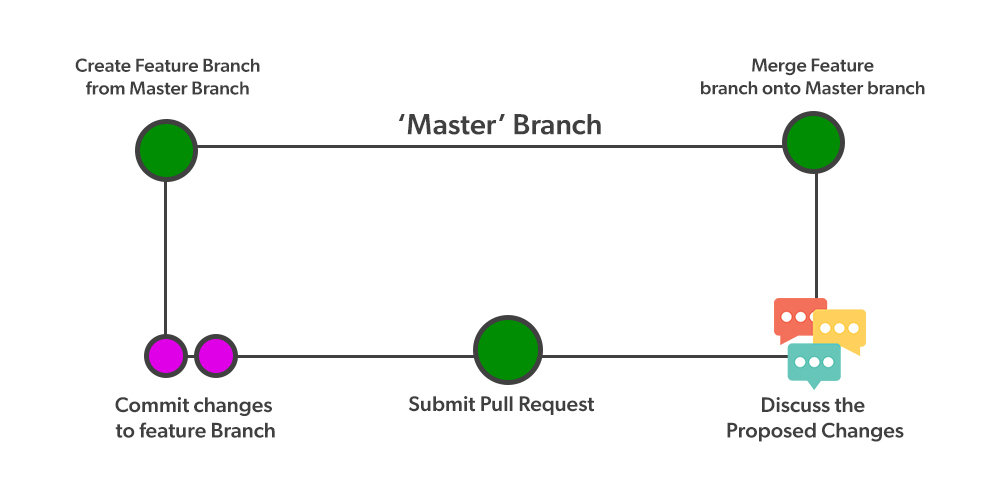
(Source: GeeksforGeeks)
Kind regards,
Bioinformatics Team